| Manufacturer | Luqeeg |
|---|---|
| Part Number | Luqeegpsr5xk7ozb |
| Parcel Dimensions | 20.29 x 14.1 x 2.49 cm; 159 g |
| Item model number | Luqeegpsr5xk7ozb |
| Power Source | Hardwire |
| Batteries Included? | No |
| Batteries Required? | No |
| Item Weight | 159 g |
| Country of origin | China |

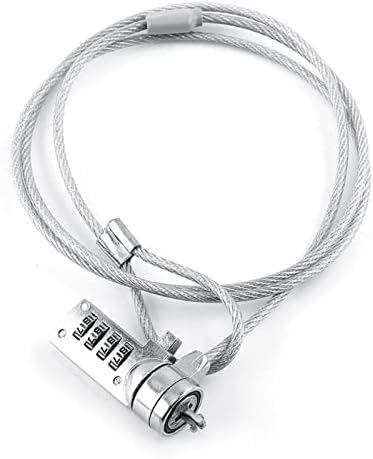
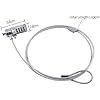
Laptop Locking Cable, Digit Password Lock, 110cm 4 Digit Password Combination Security Lock Cable Laptop Theft Deterrent Security Locks Computer Lock for Notebook PC
Purchase options and add-ons
- KEYLESS LOCK - This cable lock features a 4-digit resettable function, allowing for up to 10,000 unique combinations. You can set your own code, providing maximum security without the need for keys. It's easy to remember and eliminates the risk of losing keys!
- STRONG STEEL WIRE ROPE - The plated steel cable, combined with the alloy steel lock body, provides outstanding fortitude and stability. This lock acts as an ideal theft deterrent, offering superior strength to resist tampering and ensure the safety of your valuables.
- WIDE COMPATIBILITY - Compatible with all notebooks, desktops, and docking stations with built-in standard security locking slot holes, this lock offers wide compatibility. Its push-to-lock function allows for easy one-handed use, making it highly convenient for everyday use.
- PASSWORD RESET INSTRUCTIONS - The original password of this lock is 0000. To unlock, enter the password and hold the square button. In the unlocked state, use a small tool (such as a small screwdriver or key) to press the round button at the bottom of the lock until it is fully pressed. Then, change the password as desired. Remember not to release the round button until the password change is complete, ensuring a secure and customized code.
- SATISFACTION GUARANTEED - If there are any product problems , you can us by email or other way. We will do our best to answer your questions. Customer satisfaction is our aim.
Videos for similar products
Product Description
How To Set Password
Product information
Technical Details
Additional Information
| ASIN | B0C7R92P6B |
|---|---|
| Customer Reviews |
4.6 out of 5 stars |
| 鶹 Rank | |
| Date First Available | June 12 2023 |
Feedback
From the brand
-
A Lifestyle Choice
-
Revitalize Your Home
-
Create Your Dream Home Today
-
Luqeeg - Give Life to Enjoy!
Love what you love, Do what you do!、
Just take your time...
-
How did we get our start?
We offer different kinds of products, such as home tools, outdoor equipment, electronic products, kids' toys, and so on.
Why do we love what we do?
Time flies, and we hope that our story can tell young people that "Take your time, enjoy your own life!"
Product summary presents key product information
Keyboard shortcut
Shift
+
Alt
+
opt
+
D
Product Summary: Laptop Locking Cable, Digit Password Lock, 110cm 4 Digit Password Combination Security Lock Cable Laptop Theft Deterrent Security Locks Computer Lock for Notebook PC
From Luqeeg
4.6 out of 5 stars, 2 ratings
Customer reviewsAbout this Item
- KEYLESS LOCK - This cable lock features a 4-digit resettable function, allowing for up to 10,000 unique combinations. You can set your own code, providing maximum security without the need for keys. It's easy to remember and eliminates the risk of losing keys!
- STRONG STEEL WIRE ROPE - The plated steel cable, combined with the alloy steel lock body, provides outstanding fortitude and stability. This lock acts as an ideal theft deterrent, offering superior strength to resist tampering and ensure the safety of your valuables.
- WIDE COMPATIBILITY - Compatible with all notebooks, desktops, and docking stations with built-in standard security locking slot holes, this lock offers wide compatibility. Its push-to-lock function allows for easy one-handed use, making it highly convenient for everyday use.
- PASSWORD RESET INSTRUCTIONS - The original password of this lock is 0000. To unlock, enter the password and hold the square button. In the unlocked state, use a small tool (such as a small screwdriver or key) to press the round button at the bottom of the lock until it is fully pressed. Then, change the password as desired. Remember not to release the round button until the password change is complete, ensuring a secure and customized code.
- SATISFACTION GUARANTEED - If there are any product problems , you can us by email or other way. We will do our best to answer your questions. Customer satisfaction is our aim.
Product description
Feedback
Did you find this product summary feature useful?